
LingQ Review (2026): What You Get and Who It Suits
We made a free account on 11/11/2026, read a Spanish story until the word limit hit, asked Lynx AI and the support chat a question each, and priced Premium in the US App Store.

LingQ is worth paying for if you're past the beginner stage and would rather pick up a language from real stories, read and heard, than from drills. Premium costs $119.99 a year in the US App Store, about $10 a month. The free plan stops saving new words once you have 20, which makes it a sample rather than a way to study.
On this page
- How we scored LingQ
- What LingQ really costs per month
- What's in each plan
- Free plan or free trial: what you actually get
- Cancellation and refunds (web vs App Store and Google Play)
- Languages offered and how deep each course goes
- Your data: what LingQ collects and how to delete your account
- Support: channels, hours, and how they answered us
- What we saw inside LingQ
- Who should pick LingQ (and who shouldn't)
- What other users say
- Alternatives
- Premium: $14.99 a month or $119.99 a year (US App Store, 11/11/2026)
- Free plan, no end date: 20 saved words, 5 imports, 1 playlist
- Full refund within 30 days of a first Premium purchase (Terms)
- Account deletion is a button in Settings, with no undo
- Tutors cost extra, in Points: $10 to $20 an hour for Spanish
What we checked
- A free account, signed up on 11/11/2026 with an email, no card asked
- A Spanish Mini Stories lesson in the reader, up to the 20-word limit
- Lynx AI, the tutor list, the support chat, and the delete-account box
- US App Store prices and App Privacy (11/11/2026), Terms (February 2024), privacy policy (05/25/2018)
- Not done: a paid plan, a cancellation, a tutor session, a reply from a person
How we scored LingQ
Is LingQ worth it? For an intermediate learner who will read and listen most days, yes: it scores 7.2 out of 10. The score is held down by Features, since LingQ is a reader, not a full course, and it doesn't teach grammar step by step.
| Axis | Weight | Points | What the score is based on |
|---|---|---|---|
| Teaching quality | 30% | 7 (Good) | Reader with audio and tap-to-save words; no lesson path or grammar notes in lessons. Not from weeks of study |
| Price & free plan | 20% | 9.5 (Excellent) | Free plan with no end date; $10 a month on the yearly plan; 30-day refund on a first Premium purchase |
| Features | 15% | 3 of 10 | Offline access, an AI chat, paid human tutors; seven items not confirmed |
| Ease of use | 15% | 7 (Good) | Library open about 5 minutes after sign-up, no card; 11 of 44 low App Store reviews are about bugs |
| Trust | 10% | 7 (Good) | Self-serve deletion and a 30-day refund; the FAQ and Terms disagree on cancellation; privacy policy from 2018 |
| Language coverage | 10% | 9.5 (Excellent) | LingQ lists 40+ languages; we opened Spanish only |
The weights and how grades turn into points are on how we grade apps. Features is a count against a fixed list of 10. LingQ gets three:
- Counted: offline access (Premium only), an AI conversation partner (Lynx), and a human option, since Points pay for "tutored services like writing correction and live conversation."
- Not confirmed as of : a placement test, speech recognition with feedback, grammar explanations inside lessons, spaced-repetition review, sync between web and phone described by LingQ, a course labeled B2 or higher, a certificate.
Flashcard quizzes are on both plans, but LingQ doesn't say whether old words come back at growing intervals, so they don't count as spaced repetition.
What LingQ really costs per month
$10 a month if you pay $119.99 for a year, and $14.99 if you pay month to month, plus sales tax, which varies by state. Those are the US App Store prices on , and the six-month plan sits between them.
| Plan | Price | Per month | Source |
|---|---|---|---|
| Premium, monthly | $14.99 a month | $14.99 | App Store, |
| Premium, 6 months | $80.99 per 6 months | $13.50 | App Store, |
| Premium, 12 months | $119.99 a year | $10.00 | App Store, |
| Premium Plus, 12 months | $269.99 a year | $22.50 | App Store, |
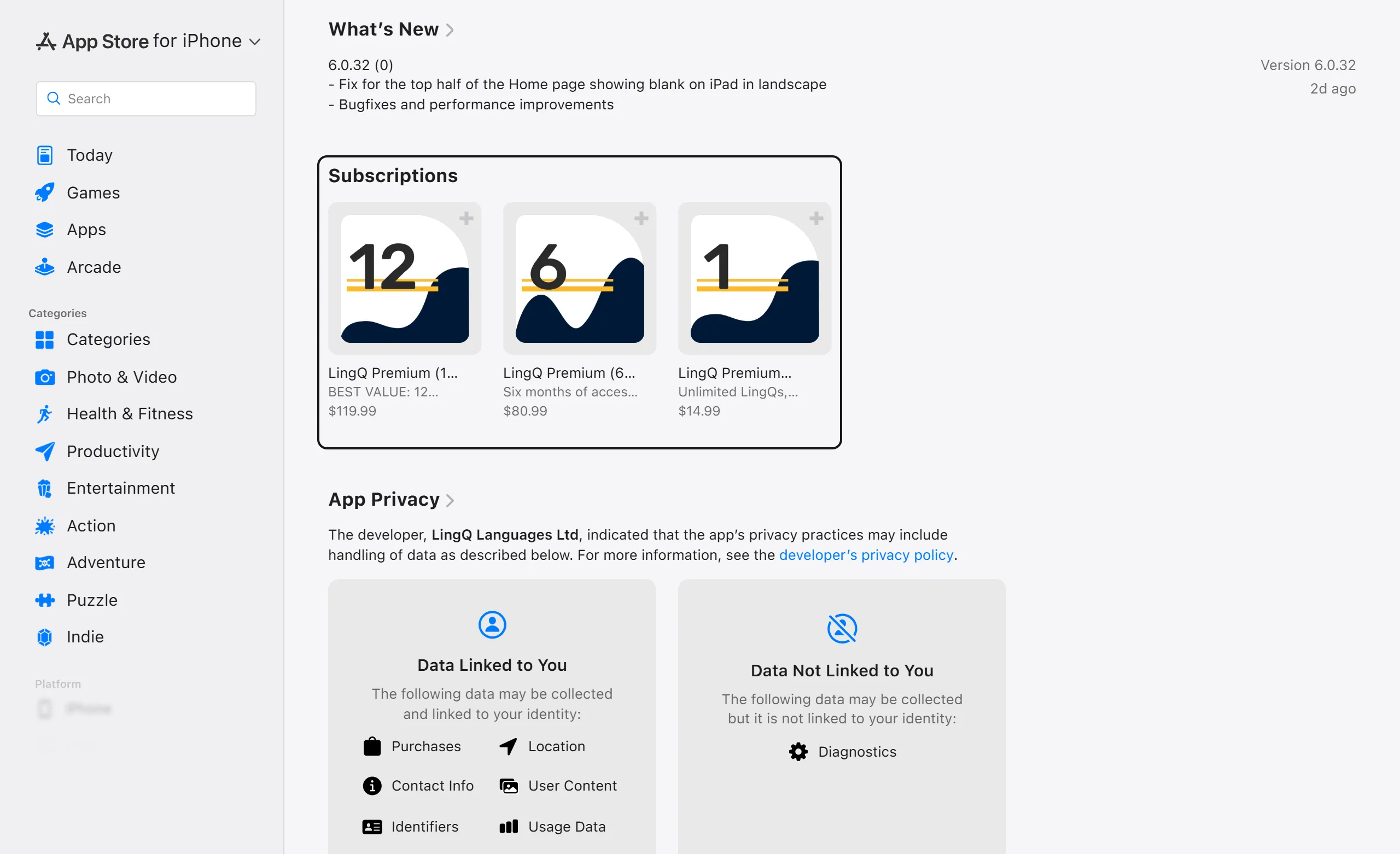
Premium Plus was on the App Store list on , along with $29.99 a month, but it wasn't there on . On the website, LingQ showed us every price in Brazilian reais, with no way to switch to dollars, so we can't give web prices in USD. The web page does sell one plan the app doesn't list, Premium for 24 months, marked "60% off," and marks the 12-month plan "54% off."
The web checkout, with the country set to the United States and no ZIP code, had no tax line before the pay button. In the app, Apple adds sales tax by state. Before you pay, the web checkout says: "This subscription will automatically renew. You can cancel all subscriptions any time before your next payment date."
One owner complaint shows why to check the price inside the app before you tap. A review from reads: "The app is listed at $119/year … but when I'm in the app I'm shown the 'promo' for 43% off it's new annual price of $179.88/year." We didn't see that offer. The plan-by-plan math is on LingQ cost.
What's in each plan
The free plan gets the whole library and the reader. Premium removes the caps and adds the tools that make reading faster.
| What you get | Free | Premium |
|---|---|---|
| Lessons with audio and a transcript | Yes | Yes |
| Saved words and phrases (LingQs) | 20 | Unlimited |
| Imported lessons | 5 | Unlimited |
| Playlists | 1 | Unlimited |
| Flashcard quizzes | Yes | Yes |
| Full sentence translations | No | Yes |
| Offline access | No | Yes |
| Statistic tracking and challenges | No | Yes |
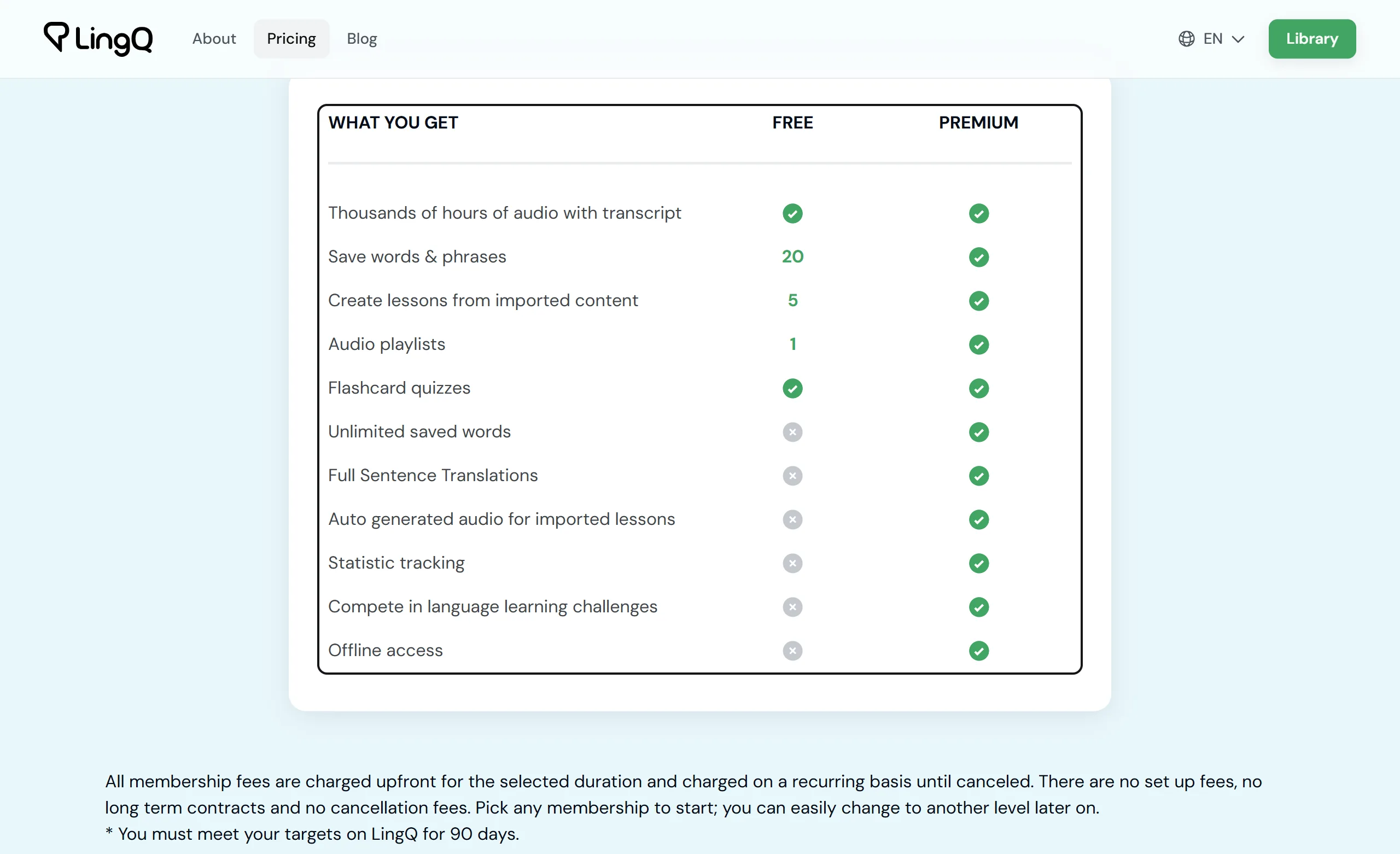
Premium Plus adds what LingQ calls "6x Audio Transcription, AI voices, Advanced Lynx Chat, AI Simplified Lessons." On the free account, the Audio Transcription row in Settings just said "Upgrade Now!". Premium covers every language: we asked the support chat, and it answered that you can "switch to any other language we offer without paying again."
Free plan or free trial: what you actually get
A free plan with no end date, and no free trial on the website. We signed up on with an email address. Google, Apple, and Facebook were the other choices. No card was asked for, and the Spanish library was open about five minutes later.
The core of LingQ language learning is the reader, and its user interface is in English while the lessons are in your target language. Each lesson is a text with audio. Words you haven't met are blue. Tap one, pick a meaning, and the word goes yellow: that's a saved LingQ. A side panel lists the LingQs on the page, so you see at a glance how much of a text is still new.
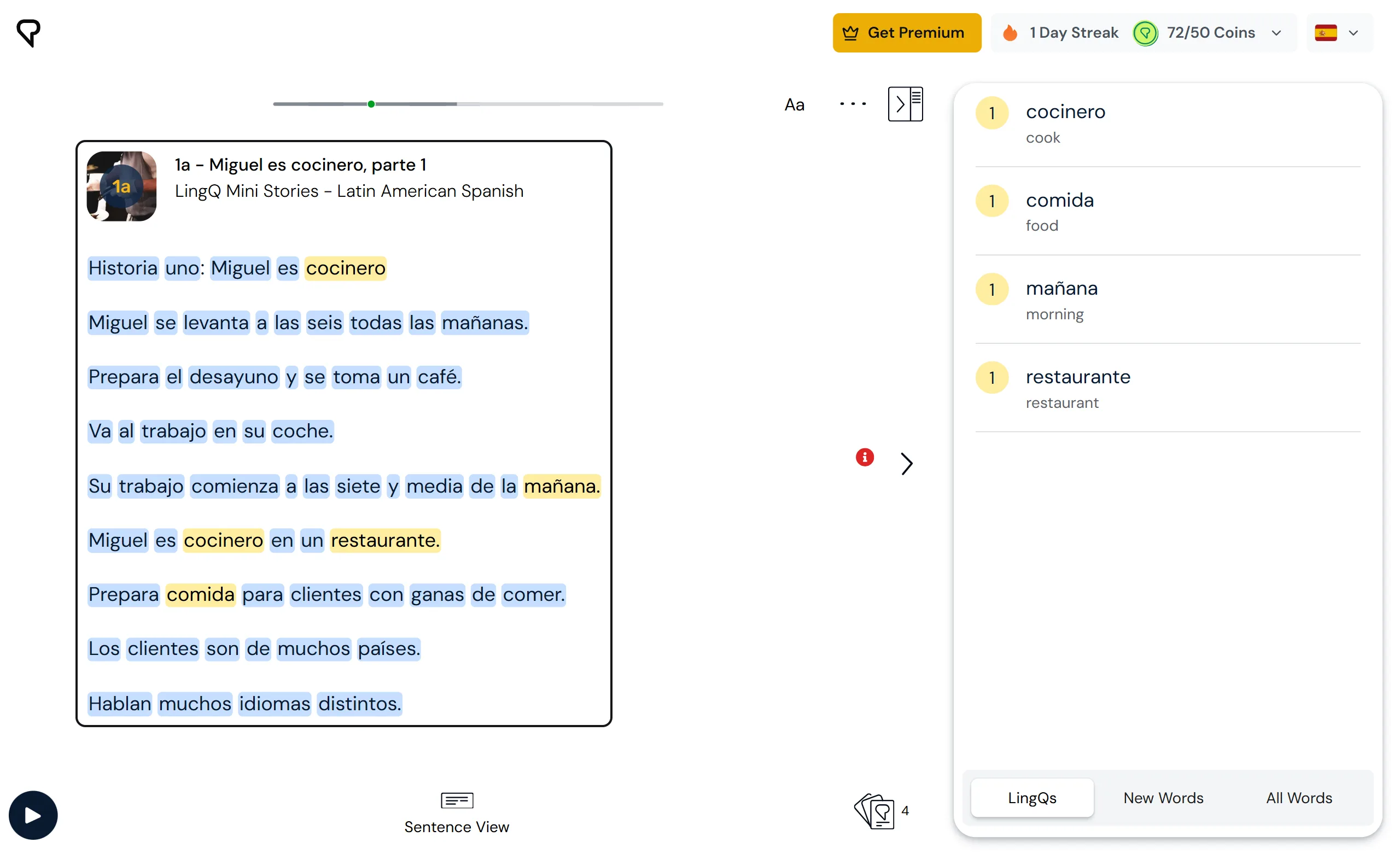
The free version allows 20 LingQs. Once they're used, tapping a new word opens a Premium offer instead of saving it.
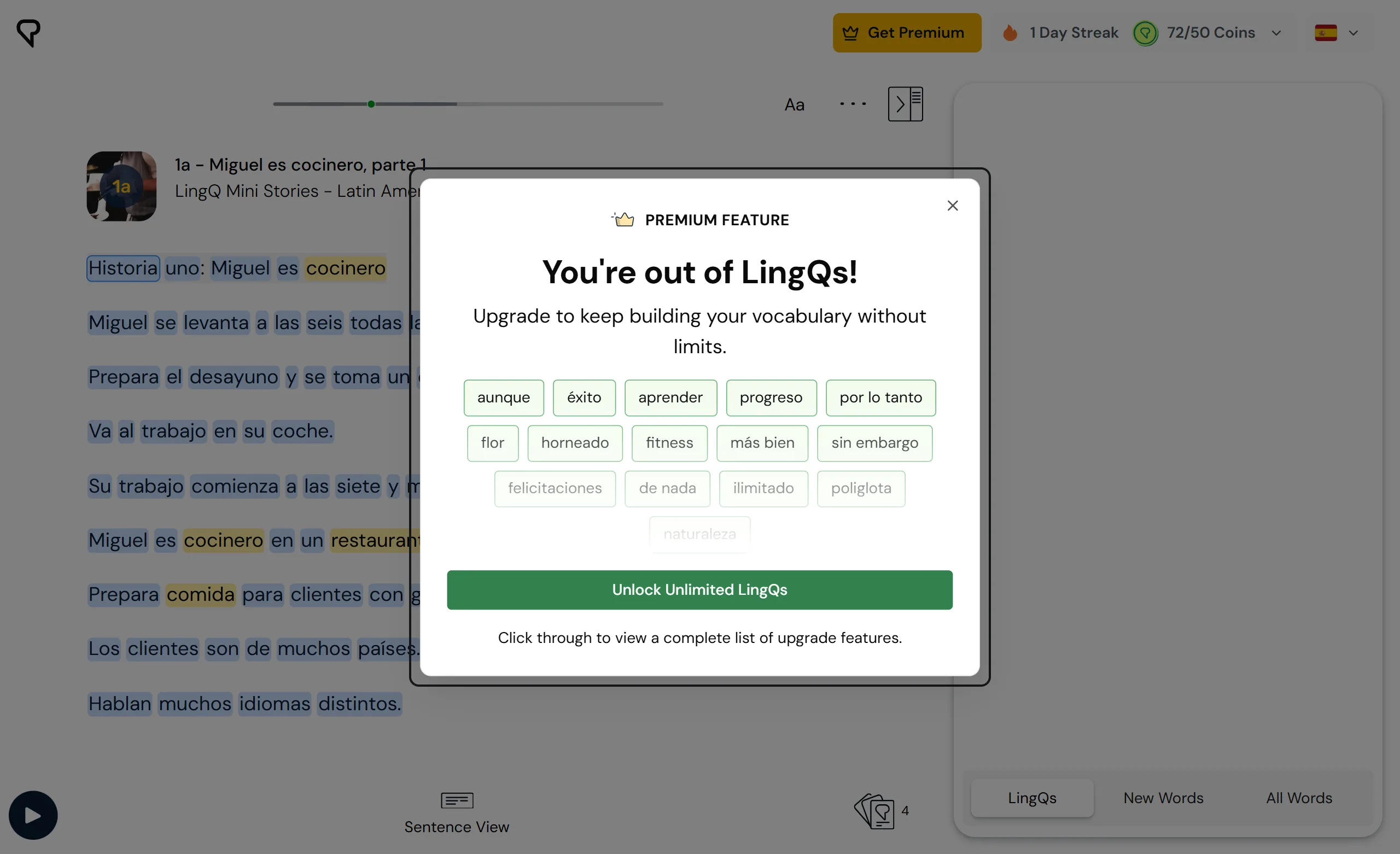
You can keep reading and listening on the free plan. What stops is the saving, which is what the flashcards and the color coding run on.
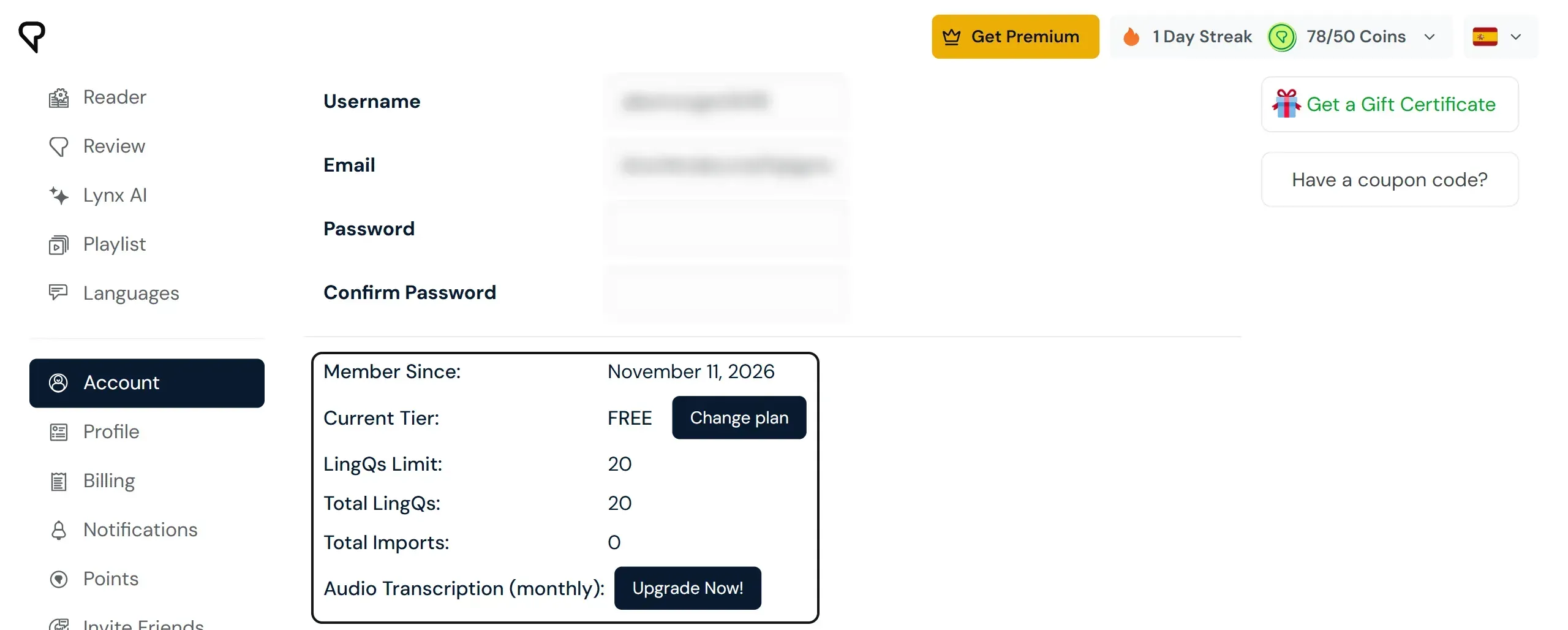
In the app, some owners describe a 7-day trial that turned into a charge. We didn't open the app's trial screen. More on the limits is on is LingQ free.
Cancellation and refunds (web vs App Store and Google Play)
A web subscription is canceled in Settings, and LingQ's own pages disagree on what happens next. The Terms (last updated February 2024) say email or a phone call doesn't cancel anything, and that cancellation takes effect at the end of the period you paid for. The same Terms say: "All of your Content will be deleted at the end of your billing period upon cancellation of your Premium membership."
The FAQ on the plan page, read on , says something else: "Your account will be cancelled immediately and all your data will be deleted from our system. You will not be charged again." If your saved words matter to you, keep that gap in mind before you cancel.
Refunds follow the Terms: a full refund within 30 days of your first Premium sign-up. After that, payments are non-refundable and there are no partial refunds. Our account was free, so there was nothing to cancel, and we didn't test a refund.
If you bought Premium in the iPhone app, it's an Apple subscription: you cancel it in your App Store subscriptions, and refunds go through Apple. On Android, the same goes for Google Play subscriptions. We didn't check LingQ's Google Play listing. Three of the 44 low App Store reviews we read were about cancellation, among them "Charged me even after I canceled" ().
Languages offered and how deep each course goes
LingQ's plan page lists "40+ languages" and "50K+ lessons." We opened only Spanish. Its library starts with Mini Stories, a series of short stories that begins with "1a - Miguel es cocinero, parte 1," each with audio, a transcript, and the word panel.
We could not find a per-language lesson count on LingQ's site or inside our free account as of . So we can't say how deep the library goes for less common languages, and we'd expect the big ones to have more. If you want to learn Spanish, French, or another big language, the free plan is enough to judge the library. Before paying for a smaller language, such as Romanian, open its library on the free plan and count the lessons at your level. For a Punjabi example, see how LingQ's Punjabi library compares with its landing-page promise.
What LingQ adds for every target language is import: you can bring in your own text, such as news articles, and turn it into a lesson with the same reader. The free plan allows 5 imports. We didn't try one.
Your data: what LingQ collects and how to delete your account
LingQ Languages Ltd, based in West Vancouver, Canada, runs the service. Its privacy policy is dated and has no section for California residents that we could find. It says Lynx, the AI chat, keeps your conversations and uses them to work out your goals and level.
The US App Store's privacy label, read on , lists seven kinds of data tied to your identity, among them location, contact info, purchases, the content you create, and usage data.
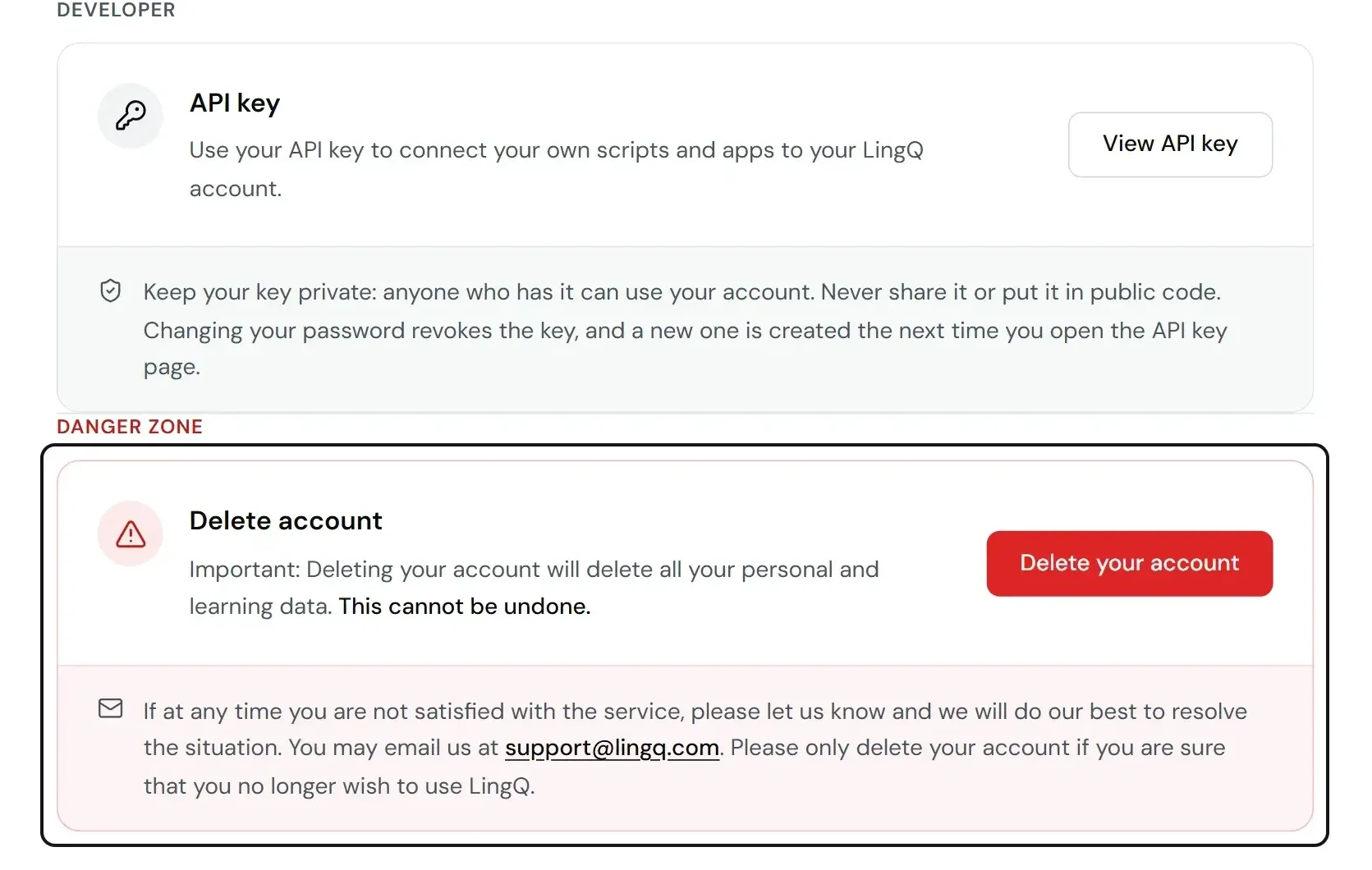
Deleting the account is self-serve. In Settings, under Account, a "Danger zone" holds a "Delete your account" button with the warning: "Deleting your account will delete all your personal and learning data. This cannot be undone." It also gives support@lingq.com. We didn't press it, since the account was still in use for this review.
Support: channels, hours, and how they answered us
Support is email plus an AI chat on the site, and LingQ's FAQ says email gets an answer "usually within 24 hours." We could not find support hours on LingQ's site or inside our free account as of .
On at 4:59 a.m. Eastern, we asked the chat on lingq.com whether Premium covers all languages. A bot answered: "Yes — if you have LingQ Premium, you can switch to any other language we offer without paying again (Premium covers all languages)." No person joined the chat. We didn't send an email.
What we saw inside LingQ
Beyond the reader, two things stood out: Lynx and the tutors.
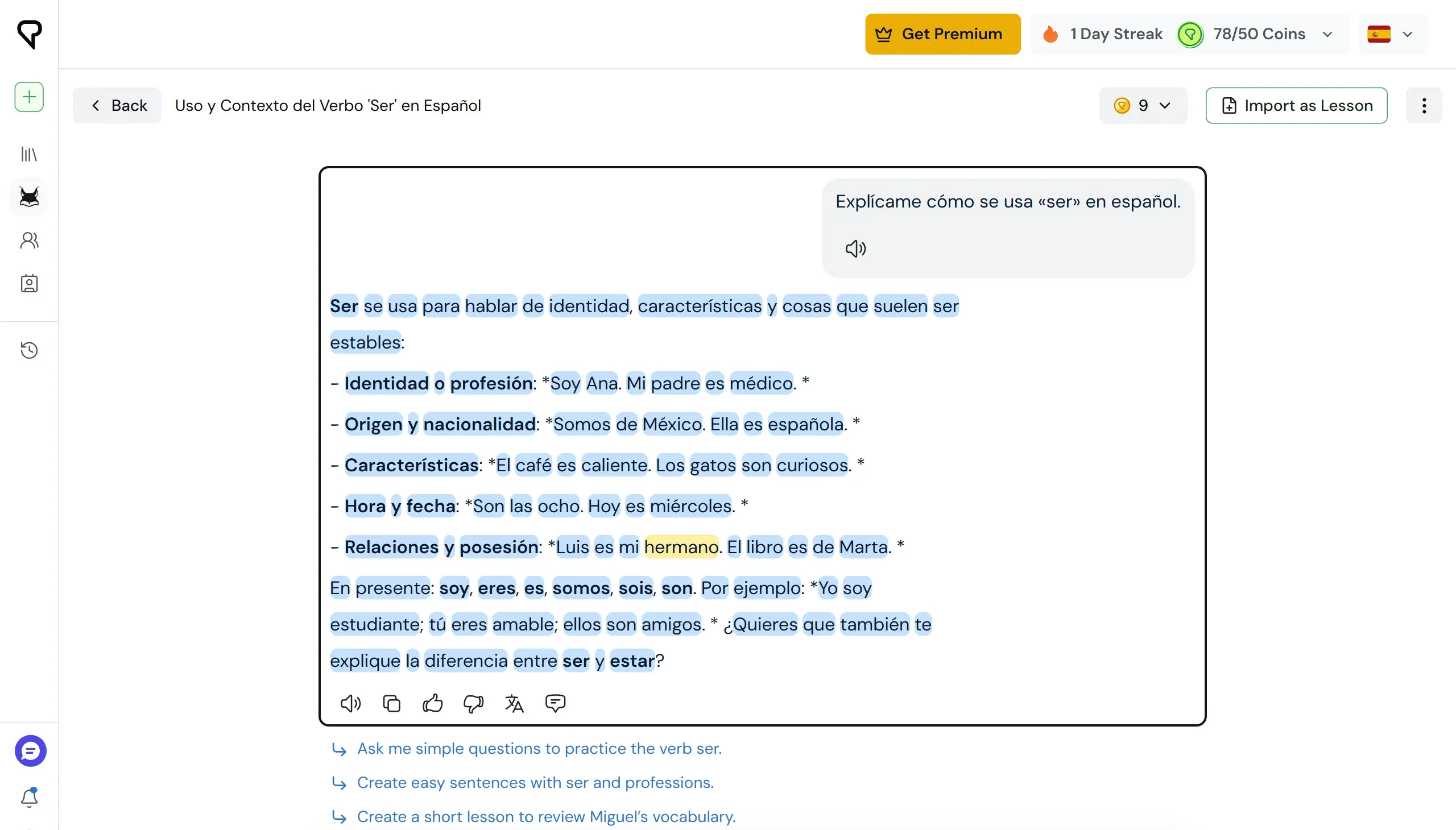
Lynx is an AI chat that works on the free plan. We asked, in Spanish, how to use "ser." It answered entirely in Spanish, with a short list of uses and examples, and offered follow-ups and an "Import as Lesson" button. One example, "El café es caliente," is the kind a teacher would mark: a hot coffee is usually "está caliente." LingQ's own line under the chat says "Lynx AI can make mistakes. Check if unsure."
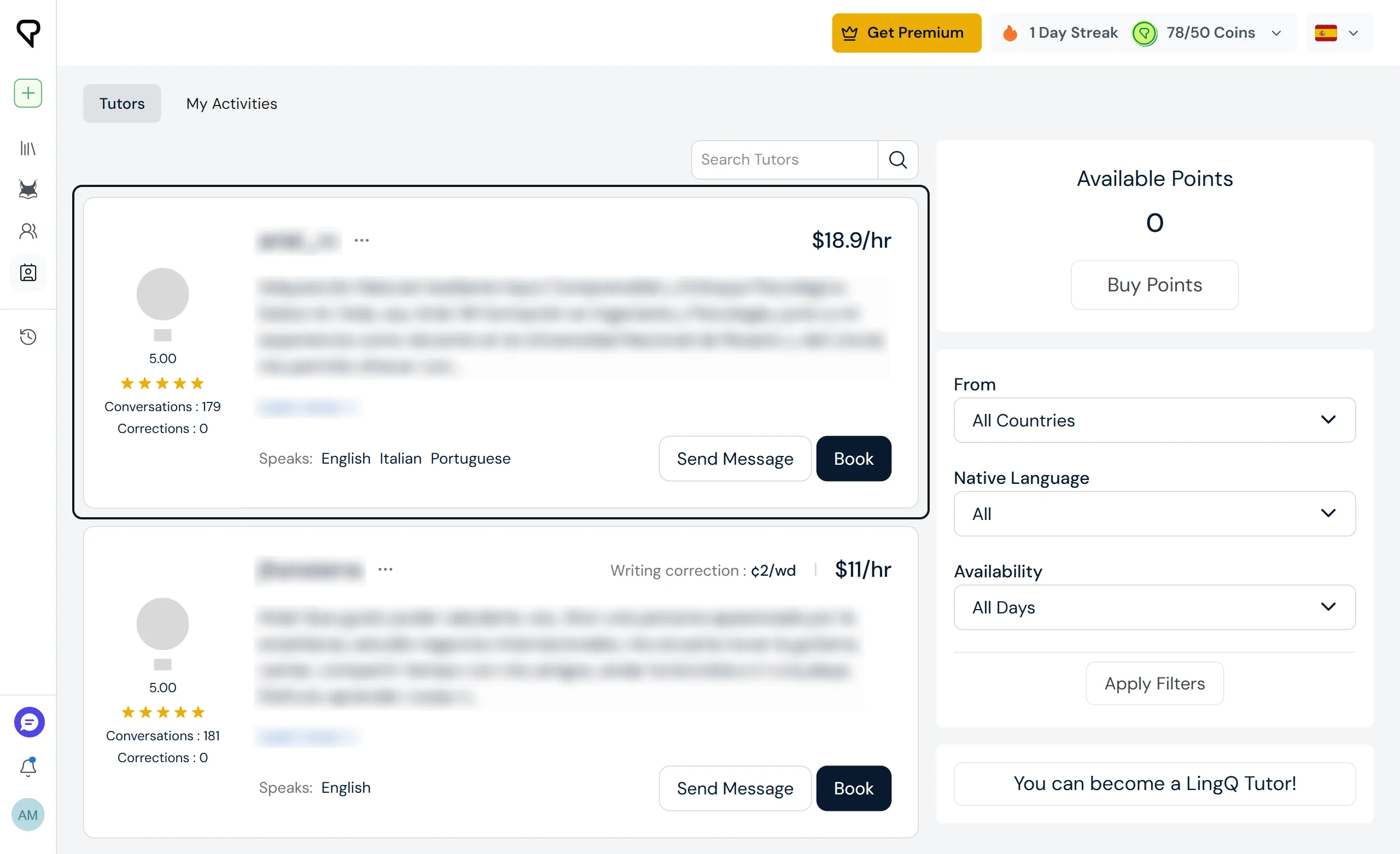
Live tutors are a separate shop. They're paid in Points, which you buy apart from Premium. Our balance was 0, with a "Buy Points" button. On the first page of Spanish tutors listed 8, at $10 to $20 an hour, median $14, and written corrections at 2 to 3 cents a word. Tutors aren't part of the Premium price.
Who should pick LingQ (and who shouldn't)
- ✓ You can already read simple texts in your target language
- ✓ You'll read or listen most days
- ✓ You'd rather learn from stories than drills
- ✕ You're starting from zero and want a lesson path
- ✕ You want grammar taught step by step
- ✕ You plan to stay on the free plan
The yearly Premium plan pays off once you'd keep Premium past eight months: eight months at $14.99 (App Store, ) is $119.92, about the price of a full year. If you're a beginner, look at a course first. The best language learning apps compares them on the same axes.
What other users say
The LingQ app had 4.7 stars from about 10K ratings in the US App Store on . Ratings that high hide the complaints, so we read the low LingQ reviews: every one- and two-star review from the past 12 months in the US App Store, 44 in all, sorted by topic.
| Topic | Reviews | Share |
|---|---|---|
| Billing and auto-renewal | 13 | 30% |
| Content, translations, AI | 13 | 30% |
| App bugs | 11 | 25% |
| Cancellation | 3 | 7% |
| Support | 3 | 7% |
| Refund | 1 | 2% |
Billing complaints include the 7-day trial in the app that turned into a charge and the price change quoted above. "Only 20 words?" () sums up the reaction to the free plan's cap. The content complaints are about AI features, translations, and the lack of a learning path. We didn't verify individual reviews.
We couldn't read LingQ Reddit threads, since Reddit blocks automated reading, so there's nothing from there here.
Alternatives
LingQ alternatives depend on what you're missing. For a guided course with grammar, Babbel was $107.40 a year, $8.95 a month, on . See the Babbel review. For vocabulary drills at a lower price, Lingvist was $79.99 a year on , in the Lingvist review. To speak with a person, italki's Spanish tutors charged a median $18 an hour in our sample, covered in the italki review.
Common questions
Is LingQ legit?
Yes. LingQ is run by LingQ Languages Ltd of West Vancouver, Canada, per its privacy policy, and the app had 4.7 stars from about 10K ratings in the US App Store on . Sign-up took an email and no card. The complaints that do come up are mostly about billing and auto-renewal.
Is LingQ free?
There's a free plan with no end date, and no free trial on the web. It opens the whole library for reading and listening, but saves only 20 words and phrases. Imports stop at 5 and playlists at 1. The details are on our page about whether LingQ is free.
How much does LingQ cost?
In the US App Store on , Premium was $14.99 a month, $80.99 for six months, or $119.99 for a year, which works out to $10 a month. Tutors are paid separately, in Points. More on plans in LingQ cost.
Can you cancel LingQ anytime?
Yes. A web subscription is canceled in Settings, and LingQ's Terms (February 2024) say email or a call doesn't count. The Terms keep access to the end of the paid period, while the FAQ says the account is canceled at once and the data deleted. A plan bought in the app is canceled in your App Store subscriptions.
Is LingQ good for learning Spanish?
For reading, yes. The Spanish library opens with Mini Stories, short graded stories with audio, and 8 Spanish tutors on the first page of the tutor list charged $10 to $20 an hour on . A complete beginner may find the reader hard without a course next to it.
Is LingQ better than Duolingo?
They do different jobs. Duolingo is a guided path of short exercises that suits beginners. LingQ is a reader with audio for people who can already follow a simple text. If you're new to a language, a course comes first. Once you can follow a simple text, a reader fits. See our Duolingo review.